Lawn Care Scheduling Software That Works
Schedule Any Type of Lawn Care Job
From one-time cleanups to recurring maintenance, Grassly handles it all.
One-Time Jobs
Perfect for new customers, special projects, or seasonal cleanups. Schedule once and get it done.
- Spring cleanup
- Leaf removal
- New customer first visit
- Special projects
Recurring Services
Set it and forget it. Automatic scheduling for regular maintenance customers.
- Weekly mowing
- Bi-weekly maintenance
- Monthly treatments
- Seasonal services
Customer Requests
Customers can request appointments through their portal. You approve and schedule.
- Service requests
- Schedule changes
- Additional services
- Seasonal add-ons
See Grassly Scheduling in Action
Real screenshots showing the visual calendar, route maps, and mobile crew views.
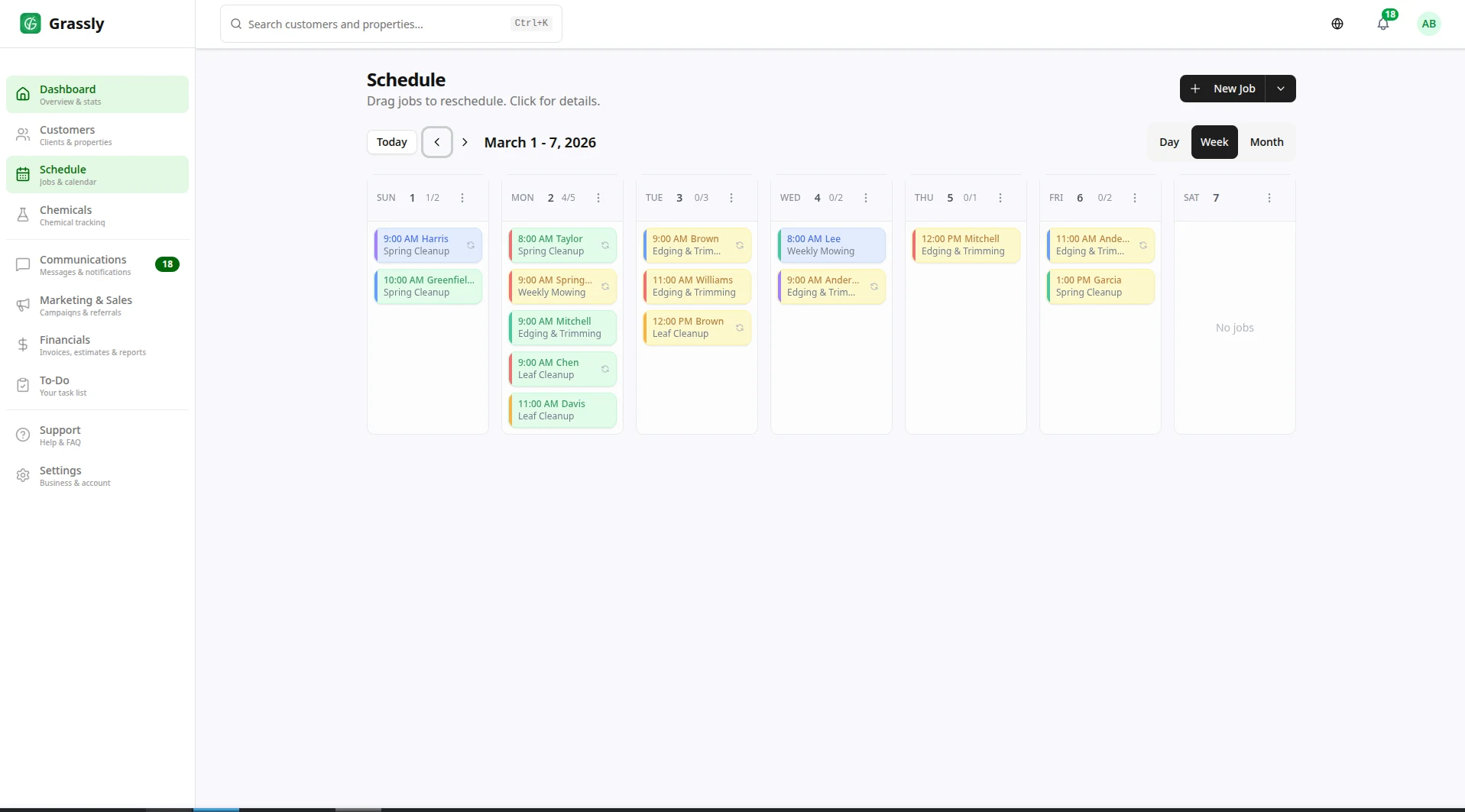
Visual weekly schedule with weather integration
Weekly schedule calendar with colored job cards and weather forecast
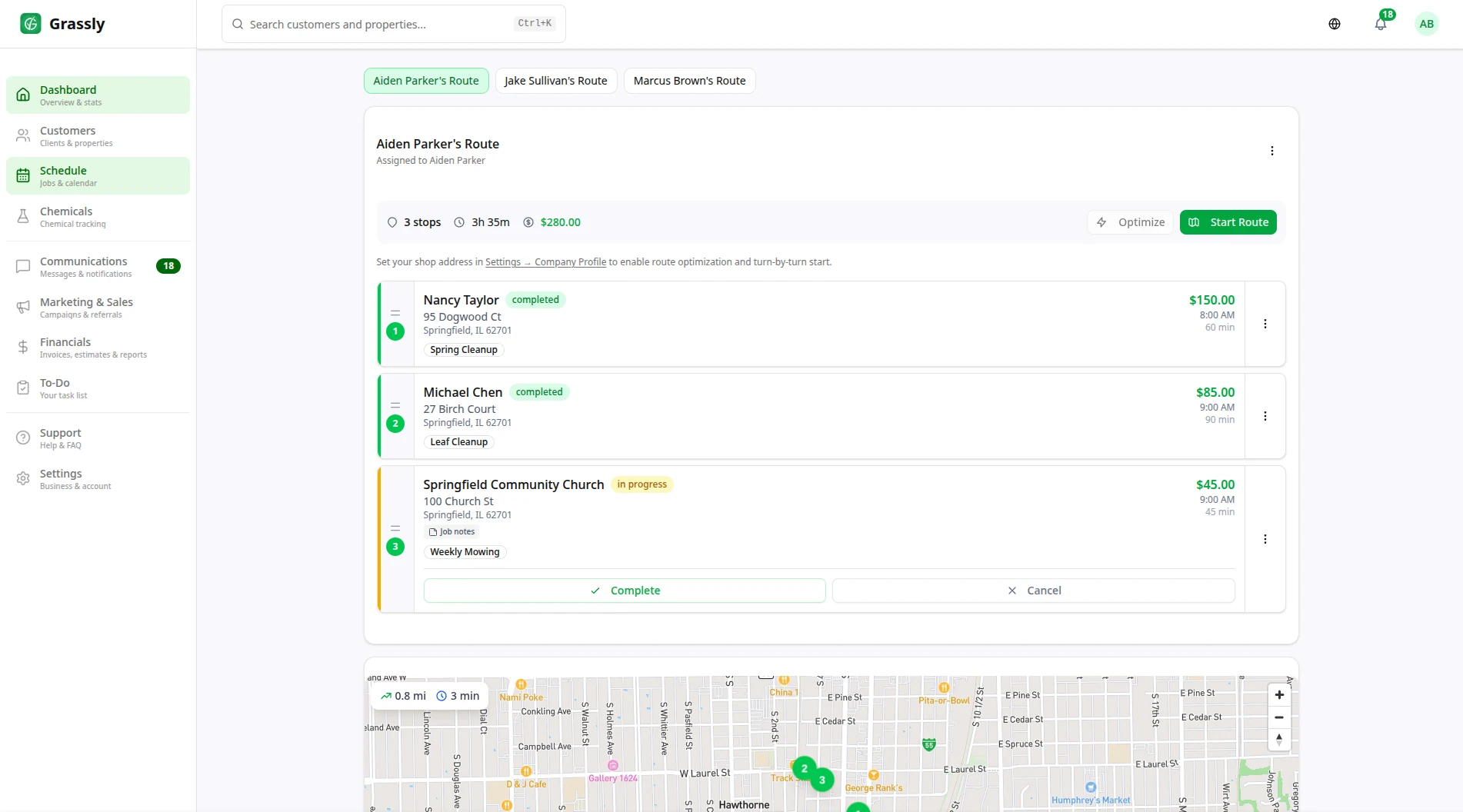
Optimized routes with turn-by-turn navigation
Day view with route map showing numbered stops and optimized path
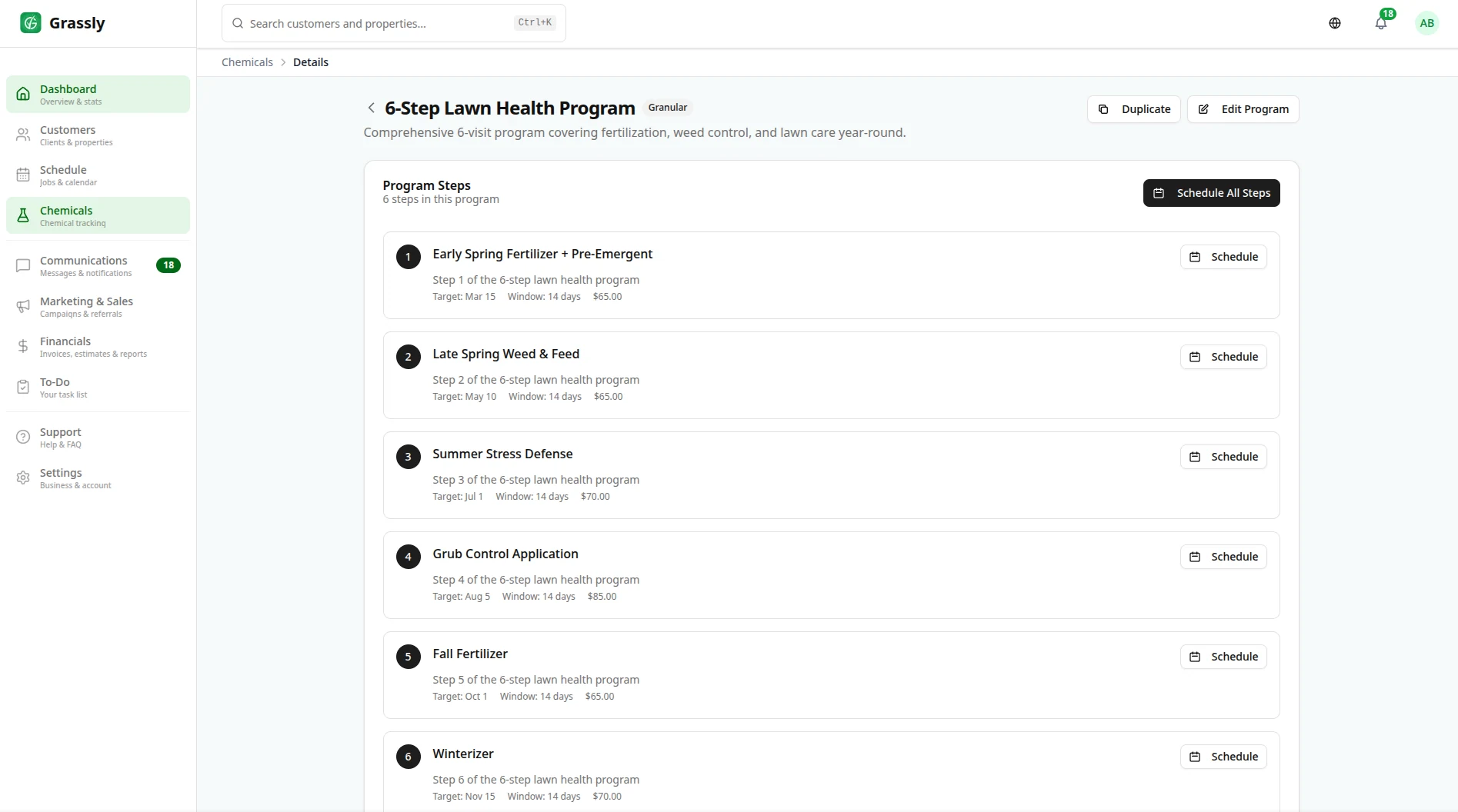
Automated multi-step programs
Multi-step lawn care program builder with step configuration
Complete Scheduling Features
Everything you need to manage your lawn care schedule efficiently.
Visual Calendar
See your entire schedule at a glance with day, week, and month views. Color-coded jobs make it easy to understand your workload.
Recurring Jobs
Set up weekly, bi-weekly, or monthly recurring services. Jobs are automatically created and assigned to your schedule.
Flexible Scheduling
Schedule one-time jobs, recurring services, or seasonal work. Handle any scheduling scenario your business requires.
Crew Assignment
Assign jobs to specific crews or team members. Balance workloads and ensure the right people are on the right jobs.
Appointment Reminders
Automatically send SMS and email reminders to customers before their scheduled service. Reduce no-shows and confusion.
Customer Self-Scheduling
Let customers request appointments through their portal. Review and approve requests from your dashboard.
Quick Scheduling
Schedule jobs in seconds with smart defaults. Drag and drop to reschedule when plans change.
Multi-Property Support
Schedule services across multiple properties for the same customer. Track each property's schedule independently.
Smart Filters
Filter your calendar by crew, service type, or status. Find exactly what you're looking for instantly.
Time Estimates
Set estimated job durations to plan your day accurately. See how long each job should take at a glance.
Service Windows
Define service windows for customers who need specific time slots. Honor preferences while optimizing your schedule.
Job Status Tracking
Track jobs from scheduled to completed. See real-time status updates as crews work through their day.
Why Grassly for Scheduling?
Built by lawn care pros who understand scheduling challenges.
Scheduling FAQ
Common questions about Grassly's scheduling features.
Can I set up recurring weekly services?
Yes! Grassly supports weekly, bi-weekly, monthly, and custom recurring schedules. Once set up, jobs are automatically created and added to your calendar. You can also pause or adjust recurring services at any time.
How do crews see their schedule?
Crew members can access their daily schedule through the Grassly mobile app or web portal. They see job details, customer information, and can update job status as they work through their day.
Can customers schedule their own appointments?
Yes, through the customer portal. Customers can request appointments, and you can review and approve them from your dashboard. You maintain full control over your schedule.
What happens if I need to reschedule a job?
Simply drag and drop the job to a new time slot in the calendar view. Grassly can automatically notify the customer of the change if you choose.
Does scheduling integrate with route optimization?
Absolutely. Once you have your day scheduled, use the route optimization feature to arrange jobs in the most efficient order. The two features work together seamlessly.
Funciones relacionadas
Explore otras funciones de Grassly que se complementan muy bien.

Comience su primera temporada con Grassly
Únase a los negocios de jardinería que gestionan su programación, facturación y equipos en una sola plataforma, ahora con trazado de propiedades, programación según el clima y ventas adicionales asistidas por IA.