Crew Management for Lawn Care Teams
Role-Based Access for Your Entire Team
Give each team member the right level of access for their role.
Owner/Admin
Full access to all features including billing, reports, and team management.
- All features
- Financial reports
- Team management
- Settings
Manager
Manage daily operations, schedules, and customer relationships.
- Scheduling
- Customer management
- Job oversight
- Team communication
Crew Lead
Manage their crew's daily work and communicate with the office.
- Crew schedule
- Job updates
- Time tracking
- Job notes
Crew Member
View their schedule and update job status as they work.
- Personal schedule
- Job details
- Time clock
- Job photos
See Crew Management in Action
Real screenshots showing team management, mobile time tracking, and crew scheduling.
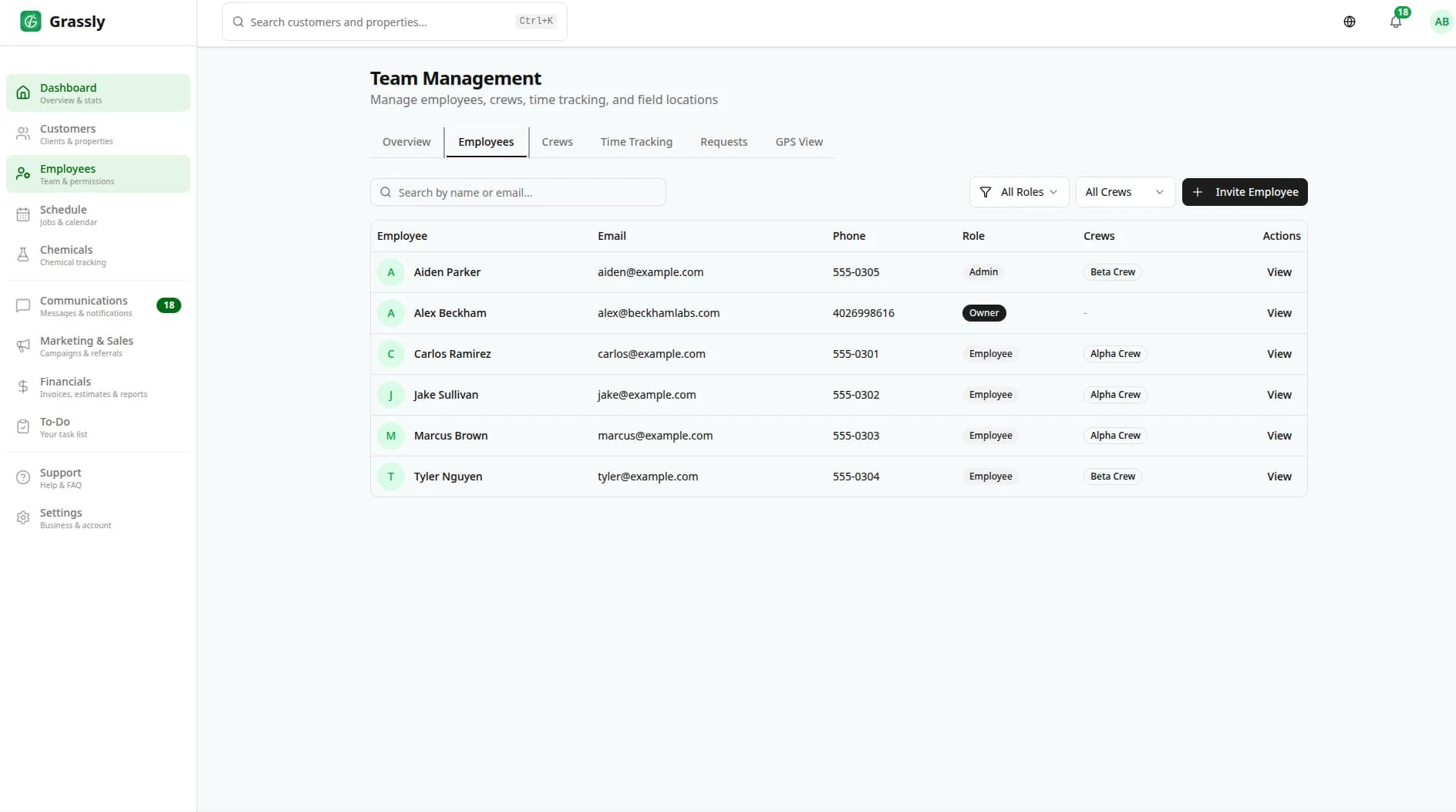
Team management and permissions
Employee roster with roles and invite management
Complete Crew Management Features
Everything you need to manage your lawn care team effectively.
Team Organization
Organize employees into crews with designated leaders. Assign jobs to entire crews or specific team members.
Time Tracking
Built-in time clock for crews to clock in and out. Track hours worked, breaks, and overtime automatically.
GPS Check-In
Optional GPS verification when crews clock in at job sites. Ensure your team is where they should be.
Role-Based Permissions
Control what each team member can see and do. Owners, managers, crew leads, and workers each have appropriate access.
Mobile-Friendly Crew Portal
Crews access their schedule, job details, and customer info from any phone's browser. Installs to the home screen as a PWA — no app-store download required.
Performance Tracking
Track crew productivity, jobs completed, and time per job. Identify your top performers and areas for improvement.
Easy Onboarding
Add new team members in minutes. Send them an invite link and they're ready to go.
Job Assignments
Assign jobs to specific crews or let them claim available work. Balance workloads across your team.
Team Notifications
Send announcements, schedule changes, or urgent updates to your entire team or specific crews.
Availability Management
Crew members can set their availability. Schedule around time-off requests and preferences.
Crew Preferences
Set crew specializations, equipment assignments, and service area preferences.
Crew Lead Portal
Crew leaders get their own dashboard to manage their team's daily operations and communicate with the office.
Built-In Time Tracking
Track crew hours without separate time tracking software.
Crew Management FAQ
Common questions about managing your lawn care team with Grassly.
How many team members can I add?
It depends on your plan. The Free plan is for solo operators, Starter supports up to 5 team members, Pro supports up to 15, and Enterprise offers unlimited team members.
Can crew members use the app on their personal phones?
Yes! Grassly works on any smartphone with a web browser. Crew members don't need to download a separate app—they simply log in through their browser or add Grassly to their home screen.
How does GPS time tracking work?
When crew members clock in, Grassly can verify their location using their phone's GPS. This is optional and can be enabled or disabled based on your preferences and local regulations.
Can I see where my crews are during the day?
Yes, you can see crew status (clocked in, on job, traveling, etc.) from your dashboard. GPS location is shown when crews are clocked in if that feature is enabled.
Does Grassly integrate with payroll systems?
You can export timesheet data in CSV format to import into your payroll system. We also integrate with QuickBooks for streamlined accounting.
Funciones relacionadas
Explore otras funciones de Grassly que se complementan muy bien.

Comience su primera temporada con Grassly
Únase a los negocios de jardinería que gestionan su programación, facturación y equipos en una sola plataforma, ahora con trazado de propiedades, programación según el clima y ventas adicionales asistidas por IA.